
How Travel Policy Compliance Software Flags Out-of-Policy Bookings
TIME
Click count
How Travel Policy Compliance Software Flags Out-of-Policy Bookings
A flight exceeds the fare cap, a hotel falls outside the approved list, or a reservation arrives too close to departure—small booking choices can create costly policy exceptions. Travel policy compliance software helps travelers and booking teams spot these issues by checking reservation details against company rules. Depending on the configuration, it can display warnings, request a justification, or route exceptions for approval.
The practical challenge is understanding what an alert actually means. A higher-priced flight may be justified by an arrival deadline. A hotel marked “not preferred” may be the only suitable option near a remote worksite. A flag identifies a mismatch with a configured rule; it does not automatically prove that the traveler made a poor decision.
The check starts with booking data, not the policy document
Most compliance checks depend on structured rules. A written policy might say employees should choose “reasonable fares,” but software needs something it can evaluate: a fixed limit, a permitted difference from a reference fare, an approved cabin, or a booking deadline. Unless the platform explicitly supports policy-document interpretation, uploading a PDF alone does not establish reliable enforcement.
The system generally combines reservation details with traveler and trip information. Relevant fields can include ticket price, cabin, departure date, hotel location, nightly rate, supplier, employee group, cost center, and trip purpose. The available fields depend on integrations and booking channels.
It then determines which rules apply. An international itinerary may have different cabin permissions from a domestic trip. A project assignment may carry a different hotel allowance from routine office travel. If an employee belongs to several policy groups, the platform needs a defined way to resolve overlapping rules.
This is why a seemingly incorrect warning sometimes originates in the employee profile rather than the itinerary. An outdated department assignment or missing project code can cause a valid booking to be checked against the wrong policy.
What actually triggers an out-of-policy flag?
The visible alert may be short, but the underlying comparison can be quite specific. These are the checks operators are likely to encounter.
Price limits and reference fares
A fixed-cap rule compares a booking price with an allowance. A relative-price rule compares the selected option with an eligible alternative, sometimes described as the lowest logical fare. The important word is “eligible.” A cheaper itinerary with an impractical connection should not automatically be treated as equivalent to a suitable direct flight.
The comparison depends on configured search boundaries: departure windows, permitted airports, connection limits, cabin, and fare conditions. If those boundaries are too broad, users may receive warnings based on alternatives that do not meet the business need.
Also check the price basis. A hotel allowance might apply to the room rate before taxes, the tax-inclusive nightly rate, or another defined amount. Airfare comparisons may or may not account for baggage and seat charges. A displayed price and a policy-tested price can differ without either being a calculation error.
Advance booking and cabin restrictions
An advance-purchase rule compares the booking timestamp with departure. Short-notice travel can therefore trigger a flag even when the selected flight is the least expensive suitable option. The alert concerns timing, not necessarily price.
Cabin rules can depend on flight duration, route, traveler eligibility, or approved accommodations. Mixed-cabin itineraries need particular attention: one segment may trigger the warning while the rest complies. Users should inspect segment-level details before replacing the entire journey.
Supplier, property, and location rules
A booking can fall below the price cap and still be flagged because the airline, hotel, or rental provider is outside a preferred program. But “preferred” and “mandatory” are not interchangeable. One policy may merely highlight contracted suppliers; another may require approval to book elsewhere.
Location checks can also matter. A hotel may be affordable but outside an allowed area or too far from the approved destination. Safety-related restrictions may be connected to separate travel-risk services. Do not assume a standard price-and-supplier checker also validates destination advisories, entry requirements, or immigration eligibility.
When the warning appears changes what you can do
Travel policy compliance software can intervene during search, at selection, before ticketing, or after a reservation has been made. These stages are not operationally equivalent.
During search, the platform may label noncompliant results, rank preferred options more prominently, or hide prohibited choices. At checkout, it may ask for a reason or stop the transaction. A pre-ticketing approval workflow can hold the request for review, although fare availability and reservation deadlines still apply.
Post-booking checks identify exceptions in reservations already created. That can help with oversight, but the opportunity to prevent spending may have passed. A hotel reservation might remain cancelable; an issued airline ticket may involve restrictions or additional costs.
A typical decision path is: identify the applicable policy, evaluate the booking, display the breached rule, and apply the configured response. If approval is required, the workflow then needs to record the decision and confirm whether booking or ticketing can proceed.
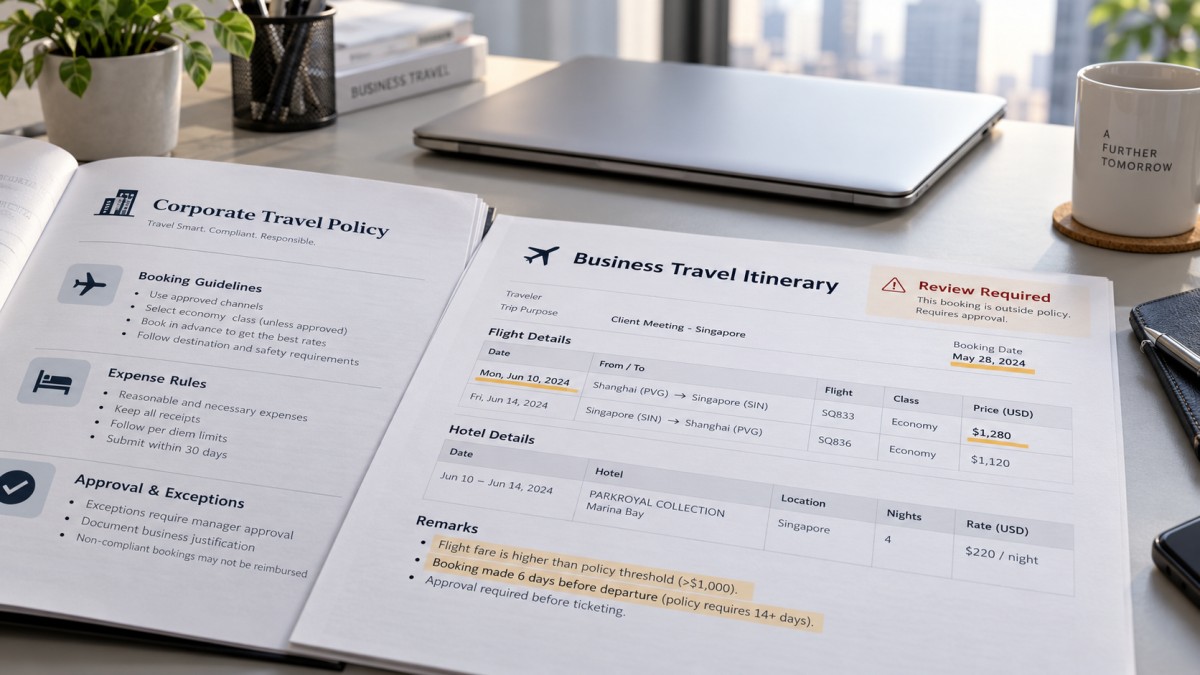
The distinction to watch is approval versus fulfillment. “Approved” does not necessarily mean “ticket issued,” and a reservation confirmation does not always mean every required approval is complete.
Warning, justification, approval, or block?
Different platforms use different labels, so read the required action rather than relying on an alert’s color. Common responses include:
- Informational warning: The traveler sees the issue but can continue without approval.
- Justification required: The booking can proceed only after a reason is selected or entered.
- Approval required: A designated reviewer must authorize the exception before the next configured step.
- Hard stop: The booking cannot continue through that workflow; an authorized alternative process may be necessary.
One itinerary can breach several rules. A late-booked premium-cabin flight might require both a timing justification and a separate cabin approval. Depending on configuration, the system may consolidate these checks or route them separately. Clearing one alert does not necessarily clear the others.
An approved exception usually remains an exception in the audit record. Approval authorizes a departure from policy; it should not silently rewrite the original booking as compliant. Reporting definitions should make that distinction visible.
How to resolve an alert without unnecessary rebooking
Start with the exact rule and the affected item. Is the issue the nightly rate, the total stay, one flight segment, or the booking date? Repeating the search before understanding the mismatch often wastes time.
Next, check the assumptions. Confirm the traveler profile, destination, currency, tax treatment, and project assignment. For a reference-fare alert, inspect the alternative itinerary. An apparent saving may disappear when it requires an overnight connection or fails the required arrival time.
If a suitable compliant option exists, changing the booking is usually straightforward. If it does not, provide a reason that an approver can evaluate. “Business need” says very little. “The lower-priced option arrives after the scheduled site induction” explains the constraint. For lodging, a useful justification might identify unavailable preferred properties or required proximity to the work location.
This is especially relevant to the cross-border industrial activity covered by the Global Industry Synergy Network (GISN). Travel for equipment commissioning, supplier inspections, and energy projects may involve remote sites rather than city-center offices. A destination-wide hotel cap cannot, by itself, establish whether an alternative is operationally suitable.
After submitting an exception, verify its status and any deadline. If approval is pending while a fare expires, follow the organization’s escalation process rather than assuming the original price is protected. Avoid making a duplicate reservation simply to get past a stalled workflow.
Where automated checks can miss the picture
The biggest visibility gap is often the booking channel. Reservations made directly with suppliers may not reach the compliance platform unless an integration, itinerary feed, or other supported capture method supplies them. An expense report can reveal spending later, but that is not the same as checking a booking before purchase.
Incomplete data creates another problem. A missing rate breakdown, incorrectly mapped hotel, or stale preferred-supplier list can produce misleading results. Depending on the platform, missing information may trigger a review, produce an “unknown” status, or prevent a particular check. Absence of a warning is not proof that every rule was evaluated.
Changes also matter. An itinerary approved at booking may become noncompliant after an upgrade, date change, or added hotel night. Whether it is checked again depends on the system’s integrations and revalidation settings. Operators should know which changes trigger another review.
When the same questionable alert keeps recurring, capture the rule name, relevant booking details, and why the suggested alternative is unsuitable. Send that evidence to the travel administrator through the approved support channel. The right fix may be a corrected profile, better supplier mapping, or a narrower comparison rule—not another workaround by the traveler.
A useful compliance flag should make the next action clear: choose a valid alternative, explain a justified exception, or escalate a data problem. Before canceling a workable itinerary, establish which of those situations you are actually dealing with.
Recommended News
- How Travel Policy Compliance Software Flags Out-of-Policy BookingsOct 21, 2026Discover how travel policy compliance software flags out-of-policy bookings, routes approvals, and helps teams resolve alerts without unnecessary rebooking.
- Best Travel Policy Compliance Software for Complex Approval WorkflowsOct 21, 2026Find the best travel policy compliance software for complex approvals. Compare top platforms, test exception routing, and uncover audit-ready controls to choose with confidence.
- Clarify travel approval authority before choosing a workflow platformOct 12, 2026What helps companies strengthen travel approval workflows before choosing a platform? Discover how clear authority, spending limits, and escalation rules prevent delays and improve control.
- How to evaluate travel policy enforcement software for exception handlingOct 12, 2026What is the best software for travel policy enforcement? Compare exception handling, approval workflows, and audit trails to choose a platform that keeps business travel moving.
- Should corporate travel approval happen before tickets are booked?Oct 12, 2026Corporate travel approval should precede ticket purchases. Discover how to control costs, speed up approvals, and handle urgent trips without losing attractive fares.
- TBEA’s 29 New Energy and Power Equipment Products Pass National-Level AppraisalOct 26, 2026TBEA’s 29 new energy and power equipment products reportedly passed national-level appraisal. Explore the results and key checks for smarter procurement decisions.
- Baby Sleeping Bags: Choosing the Right TOG Rating and a Safe FitOct 25, 2026Choosing babysleepingbags? Discover how to match TOG ratings to room temperature, check for a safe fit, and avoid overheating with practical tips to help you shop confidently.
- Eco Building Solutions in the UAE: Estidama vs. Al Sa'fat RequirementsOct 21, 2026Explore eco building solutions UAE projects need. Compare Estidama and Al Sa’fat ratings, technical requirements and compliance evidence to reduce approval risks and choose with confidence.
- CE Marking: How to Identify Your Product Category and Applicable EU RulesOct 19, 2026Explore product category analysis CE assessors can use to identify applicable EU rules, resolve overlapping obligations, and plan conformity assessment before costly testing.
- What Drives the Cost of Technical Specification Analysis Before Procurement?Oct 14, 2026Understand technical specification analysis cost before procurement. Explore key cost drivers, compare review scopes, and reduce unnecessary spend without compromising purchasing confidence.
- Outdoor Furniture Prices by Material: Purchase, Delivery, and Upkeep CostsOct 27, 2026Compare outdoor furniture price by material, including purchase, delivery, and upkeep costs. Discover how to evaluate supplier quotes and choose better long-term value.
- Real-Time Industrial Trend Analysis: Which Indicators Signal Demand Shifts?Oct 23, 2026Use real time industrial trend analysis to spot demand shifts early. Discover how orders, inventory, and factory activity reveal buying signals and guide smarter business decisions.
- Global Sourcing for Procurement: How to Compare Total Landed CostsOct 22, 2026Optimize global sourcing for procurement by comparing total landed costs, from freight and duties to quality risks. Discover how to uncover hidden costs and choose suppliers with confidence.
- How Can Data Analysis Compare Global Supplier Pricing Trends?Oct 12, 2026How to use data analysis to compare global supplier pricing trends? Learn to align quotes, track currency impacts, and compare landed costs for smarter sourcing decisions.
- Vietnam Precast Concrete Market: Demand Drivers, Capacity, and Buyer RisksOct 09, 2026Vietnam precast concrete market insights: assess demand drivers, production capacity, logistics, quality compliance, and buyer risks for smarter sourcing and investment decisions.
All Categories
Hot Articles
- Outdoor Furniture Prices by Material: Purchase, Delivery, and Upkeep CostsOct 27, 2026Compare outdoor furniture price by material, including purchase, delivery, and upkeep costs. Discover how to evaluate supplier quotes and choose better long-term value.
- Chile’s BESS Cut Curtailment as Projects Under Construction Are Expected to Triple CapacityOct 27, 2026Chile’s BESS are cutting renewable curtailment, while ACERA expects projects under construction to triple storage capacity. Explore what this could mean for developers and suppliers.
- Energy Management in North America: Using Demand Response to Cut Facility CostsOct 26, 2026Explore energy management North America facilities can use to cut costs with demand response. Learn to assess programs, protect operations, and unlock reliable savings.